Typescript language service plugins are great for intercepting typescript language servers. There aren't many resources available to back them up, unfortunately.
In the Part 1 of the series, I will outline some of the features of typescript plugins using a small example plugin. We will learn what they can do and how to enable them in a ts project.
In Part 2, lets learn how to embed typescript service plugins using a VS code extension (useful if you are extension developer) React CSS Modules, an extension I built to improve CSS modules experience in VS Code
What are they ?
Have you ever wondered about the 'plugins' field in tsconfig's compiler options?
# tsconfig.json
{
"compilerOptions":{
  "plugins":[
      {
        "name":"awesome-ts-plugin"
      }
    ]
  }
}
They are nothing but additional programs that are run inside your editor.
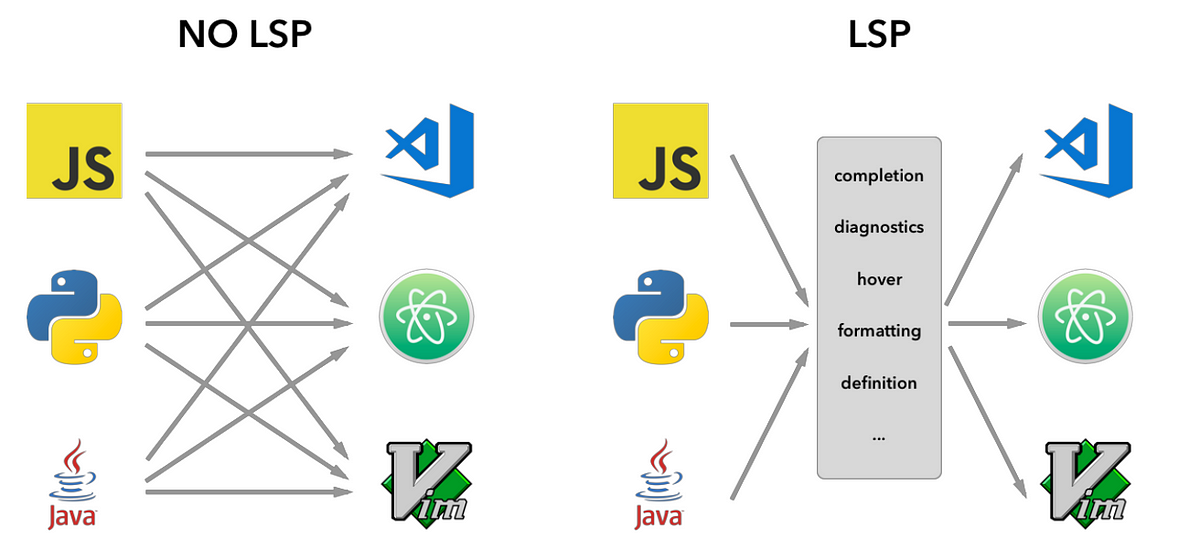
They act as a messenger between typescript server and your editor. They are also capable of sending their own messages.
TypeScript Language Service Plugins ("plugins") are for changing the editing experience only
When do you need them ?
Lets use an example to understand why and when do we need them.
So you are working on a React project that uses styled-components. styled-components is one of the most popular CSS in JS framework.
Unlike CSS modules or CSS files in general, styled-components enables you to write CSS inside typescript modules (with all CSS syntax sugars).
Lets imagine you have a Button component that exposes a html 'button' element such as the following.
# Button.ts
export const Button = styled.button`
  padding: 1rem;
  border-radius: 0.5rem;
`;
Do you think that you will get CSS intellisense in your code editor for the above?
Yeah you guessed it right. Sadly You won't!
That is because TS language server doesn't speak CSS. So your editor cannot provide any CSS related intellisense.
That's when TS language service plugins come into the picture. Luckily for styled-components users, there is already a great plugin added by styled-components maintainers which you can install in VS code or add it as a plugin to your tsconfig
This plugin acts as middleman between the language server and your editor. Whenever it encounters the syntax 'styled.<element>', it takes control over the intellisense providers (completions, definitions etc of your editor environment that is running the language server) and provide the necessary intellisense for CSS language
Usage
- As a plugin included in tsconfig.json
pluginoption
"compilerOptions":{
   "plugins":[
    {
      "name":"some-ts-plugin"
      // ...other options of the plugin goes here
    }
   ]
   // rest of your compiler options
}
As a plugin inside VS Code's extension context (only for vs code extension developers)
- In the above scenario of
styled-components, thetypescript-styled-plugincomes built in with the vs code extensionvscode-styled-components - The extension under its hood uses the
typescript-styled-plugin
- In the above scenario of
In this post, lets create a small typescript plugin that intercepts 'Go to Defintion' action in VS code. For the purpose of this example, lets remove the defintion results of useState hook in React Projects
Initial Setup
For this example I'm gonna use pnpm as package manager. Also the source is available on github for your reference.
Open your favourite termnial and create a directory called ts-remove-usestate which is what we will call our plugin.
Let gets started by initialising a new pnpm project
pnpm init
the above command would create the following entry in your package.json
{
  "name": "ts-remove-usestate",
  "version": "1.0.0",
  "description": "",
  "main": "index.js",
  "scripts": {
    "test": "echo \"Error: no test specified\" && exit 1"
  },
  "keywords": [],
  "author": "",
  "license": "ISC"
}
Lets leave it as is for now and come back to it later.
Open the directory in your favourite code editor. Mine is VS code!
Dependencies
For this project we require only typescript to be our dependency so lets go ahead install it
pnpm add typescript
NOTE: It shouldn't matter if you don't install the latest version but for the purpose of this example lets make sure that you install typescript@4.9.X
Tsconfig
So far so good!. We have typescript installed as a dependency.
Lets go ahead and create our tsconfig.json with the following contents
{
  "paths": ["src/**"],
  "exclude": ["examples"],
  "compilerOptions": {
    "target": "es2017" /* Set the JavaScript language version for emitted JavaScript and include compatible library declarations. */,
    "module": "commonjs" /* Specify what module code is generated. */,
    "sourceMap": true /* Create source map files for emitted JavaScript files. */,
    "outDir": "./out" /* Specify an output folder for all emitted files. */,
    "esModuleInterop": true /* Emit additional JavaScript to ease support for importing CommonJS modules. This enables `allowSyntheticDefaultImports` for type compatibility. */,
    "forceConsistentCasingInFileNames": true /* Ensure that casing is correct in imports. */,
    "strict": true /* Enable all strict type-checking options. */,
    "skipLibCheck": true /* Skip type checking all .d.ts files. */
  }
}
All our source will be inside src directory and compiled output is going to be in out directory as specified by outDir in compilerOptions.
We will create examples folder later when enabling our plugin in react project.
Init Function
Lets create a src directory and new index.ts file
When your plugin is listed in tsconfig.json , the typescript-language-server identifies the plugin using the name and it will look for a init function exported from the module.
So lets start by creating our init function in index.ts
function init({
  typescript: ts,
}: {
  typescript: typeof import("typescript/lib/tsserverlibrary");
}) {
  // Plugin logic will go here
}

export = init;
Export syntax supported by typescript is used here to allow CommonJS and AMD workflow (more on that here)
The init function receives an object with the typescript property attached to it. It will be the representative of the ts server namespace which we will exploit soon.
Creating Proxy Language service
Typescript language server expects the init function to return an object with a property create.
create is a function which is defined as follows
function init({
  typescript: ts,
}: {
  typescript: typeof import("typescript/lib/tsserverlibrary");
}) {
  // create function
  function create(info: ts.server.PluginCreateInfo) {
    // This function will create our proxy interceptor
  }

  return { create };
}
The create function should create a proxy, which is a decorator that wraps the main ts language server instance.
This proxy should be returned by the create function. So our create function is going to look like
/// rest of the code  above
function create(info: ts.server.PluginCreateInfo) {
  const proxy: ts.LanguageService = Object.create(null);
  for (let k of Object.keys(info.languageService) as Array<
    keyof ts.LanguageService
  >) {
    const x = info.languageService[k]!;
    // @ts-expect-error - JS runtime trickery which is tricky to type tersely
    proxy[k] = (...args: Array<{}>) => x.apply(info.languageService, args);
  }
  return proxy;
}
/// rest of the code below
Decorator pattern through Object.create is used here to avoid any effects on the main language server instance. Any behavioural change we might add to the proxy instance will not affect the main language server instance.
Putting it all together
function init({
  typescript: ts,
}: {
  typescript: typeof import("typescript/lib/tsserverlibrary");
}) {
  function create(info: ts.server.PluginCreateInfo) {
    const proxy: ts.LanguageService = Object.create(null);
    for (let k of Object.keys(info.languageService) as Array<
      keyof ts.LanguageService
    >) {
      const x = info.languageService[k]!;
      // @ts-expect-error - JS runtime trickery which is tricky to type tersely
      proxy[k] = (...args: Array<{}>) => x.apply(info.languageService, args);
    }
  }
  return { create };
}

export = init;
Testing
In order to test the plugin lets add a simple log message that says 'Hello from remove use state!'. We can accomplish this by doing
function create(info: ts.server.PluginCreateInfo) {
  /// Proxy setup is above
  info.project.projectService.logger.info("Hello from remove use state!");
  return proxy;
}
Lets compile everything together using ts compiler
tsc -p tsconfig.json --watch
If there a no ts errors , the compilation should be successfull
We should now have the compiled source in out/index.js. So this will be our main entry file for the outside world. Lets go ahead and add this to the main field of package.json
{
  "main": "out/index.js"
}
Lets also add a compile script
{
  "scripts": {
    "compile:watch": "tsc --watch"
  }
}
Enabling
To enable the plugin, lets quickly create a react project with vitejs. Lets make a directory called examples.
Lets create a react project called test-ts-plugin inside examples
cd examples
yarn create-vite
The create-vite CLI will guide you through the steps. Call the project as test-ts-plugin
Choose React and Typescript as the stack.
Run the below commands and make sure you have all the dependencies installed.
cd test-ts-plugin
yarn
Open this folder in VS code.
Now lets enable our ts-remove-usestate plugin in the newly created project.
Lets first add the plugin to the test-ts-plugin/tsconfig.json
{
  "compilerOptions": {
    /// rest of the compiler options
    "plugins": [
      {
        "name": "ts-remove-usestate"
      }
    ]
  }
}
Open App.tsx inside your VS code.
Since the plugin is activated by typescript-language-server running inside VS code extension context, we can search for our plugin in ts server logs and see if the activation was successfull.
Open VS code command pallete and run the following command
> Typescript: Open TS Server log
The above command should open the TS server log in a new tab.
Search for our plugin name ts-remove-usestate inside the logs. You should see this message
Info 27 [17:39:35.837] Failed to load module 'ts-remove-usestate'
in your server log.
Now what did happen?. You asked TS language server to activate/load our plugin but it couldn't find it in your node_modules.
So we need to add the plugin as a dependency. Lets add it as a dev dependency.
Now if the plugin is available in npm , we might as well do
yarn add -D ts-remove-usestate
Since our plugin is not available in npm but only in our filesystem lets ask yarn to install it by from our filesystem
{
  "devDependencies": {
    "ts-remove-usestate": "file://<full_path_to_the_plugin_in_your_file_system>"
  }
}
Install it by running
yarn
Now lets Reload the VS Code window by executing
> Developer: Reload Window
It's also important to choose the right Typescript version to test your plugin. Make sure to choose the workspace version of typescript by executing the following command in VS code command pallette
> Typescript: Select Typescript Version
Select the workspace version of the typescript.
Now check the TS server log. You should see the message from our plugin
Hello from remove use state!
If everything went out well , you should see the above message.
Yay! our plugin works!!
Now that our plugin is enabled , lets go ahead and build the desired functionaility functionality
Intercepting Go to Defintions
Go to Definition is great VS code feature that is used by millions of developers.
With the power of typescript declarations typescript-language-server redirects us to the right definition for functions, classes, variables, interfaces, types etc when Go to Definition is fired
Now in our plugin we are going to intercept the Go to definition action by taking leverage of the getDefinitionAndBoundSpan method avaiable on the proxy instance we created earlier
proxy.getDefinitionAndBoundSpan = (fileName, position) => {};
The getDefinitionAndBoundSpan method recieves the fileName of VS code document that is active in your editor and the position where the Go to Definition was triggered
Now ts server expects us to return meaningful definition references in the shape defined by getDefinitionAndBoundSpan
We can obtain the prior definitions by getting it from the language service like the following
proxy.getDefinitionAndBoundSpan = (fileName, position) => {
  const prior = info.languageService.getDefinitionAndBoundSpan(
    fileName,
    position
  );

  return prior;
};
A list of definitions is inside prior.defintions. If none are available then getDefinitionAndBoundSpan will return undefined hence our prior will be empty so we could just return that.
so lets handle the undefined case before doing anything further
/// Rest of the code above
if (!prior) {
  return;
}
Now our desired goal(in this Part of the post) is to do nothing when Go to Def is triggered by useState. Before we do that lets first see what happens when you initiate Go to Def on useState
It should take you to the official react type definitions file and more specifically to this location in the file
/**
 * Returns a stateful value, and a function to update it.
 *
 * @version 16.8.0
 * @see https://reactjs.org/docs/hooks-reference.html#usestate
 */
function useState<S>(
  initialState: S | (() => S)
): [S, Dispatch<SetStateAction<S>>];
NOTE: If you see something different than the above then you might be on different version of react so don't worry about it
Now lets tell our plugin to filter out useState from the prior.defintions list by doing the following
/// Rest of the code above
prior.definitions = prior.definitions?.filter((def) => def.name !== "useState");
We are filtering out definitions with the name useState and reassigning the new list to prior.definitions
Lets test this.
NOTE: Make sure to re install the plugin in the examples/test-ts-plugin by doing a fresh install of node_modules. Alternative use yarn link to avoid re installation. In anycase make sure to use the workspace version of typescript
After restarting the ts server , if you try Go to Definition on useState the editor will no longer take you there.
If this happens then our plugin succesfully intercepted Go to Definition and removed useState from the final results.
Yay!! Our job is done. We have successully managed to intercept defintion provider of VS code.
Great! Putting it all together
// src/index.ts
function init({
  typescript: ts,
}: {
  typescript: typeof import("typescript/lib/tsserverlibrary");
}) {
  function create(info: ts.server.PluginCreateInfo) {
    const proxy: ts.LanguageService = Object.create(null);
    for (let k of Object.keys(info.languageService) as Array<
      keyof ts.LanguageService
    >) {
      const x = info.languageService[k]!;
      // @ts-expect-error - JS runtime trickery which is tricky to type tersely
      proxy[k] = (...args: Array<{}>) => x.apply(info.languageService, args);
    }
    info.project.projectService.logger.info("Hello from remove use state!");
    proxy.getDefinitionAndBoundSpan = (fileName, position) => {
      const prior = info.languageService.getDefinitionAndBoundSpan(
        fileName,
        position
      );
      if (!prior) {
        return;
      }
      prior.definitions = prior.definitions?.filter(
        (def) => def.name !== "useState"
      );

      return prior;
    };
    return proxy;
  }
  return { create };
}

export = init;
Great 🤓 !! you've learnt to write typescript plugins
Learn how to activate typescript plugins using VS Code extension in Part 2 of this post